
This guide explains how to use the 'Agendas and minutes' website. Use this website to find agendas and minutes for Governing Body, local board and committee meetings and workshops held from 2010.
Te ara whakamahi i te pae tukutuku o ‘Ngā rārangi take me ngā meneti’ How to use the 'Agendas and minutes' website
For a detailed list of meetings and workshops from previous years, refer to the 'Past term meeting documents' section at the bottom of this page.
How to search the 'Agendas and minutes' website
The Agenda and Minutes website contains all the agendas and minutes published for Governing Body, committee, local board and advisory panel meetings and workshops.
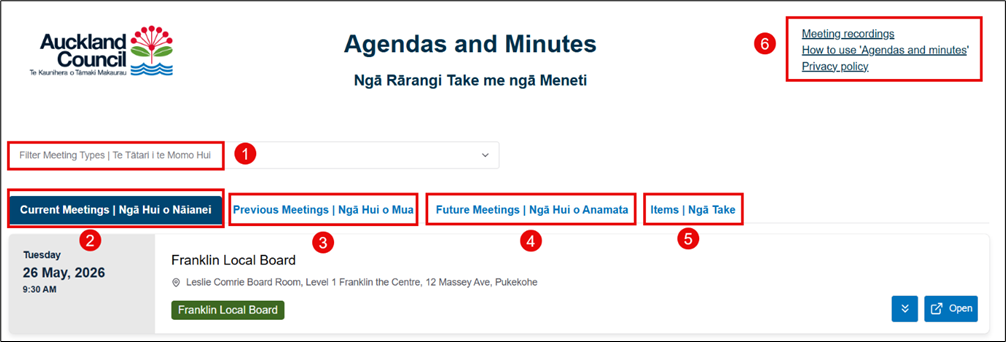
- Filter Meeting Types: Select this field to view the list of available meeting types.
- Current Meetings tab: This tab displays all current meetings and workshops. Meetings and workshops are listed by date, with the earliest listed first.
- Previous Meetings tab: After a meeting or workshop has been held, it moves to the 'Previous Meetings' tab.
- Future Meetings tab: This tab displays all future meetings.
- Items tab: Select this tab to search for a specific agenda item.
- Quick links: Select these links to access past meeting recording or guidance documents.
How to search for a current meeting or workshop
1. Select the drop-down menu in the 'Filter Meeting Types' field. This will list all the meeting types and workshops for the 2025-2028 election term.
Note: A local board meeting name is the same as the local board name, for example, 'Albert-Eden Local Board.' Workshops have the word 'workshop' at the end, for example, 'Albert-Eden Local Board workshop'.
2. Select a meeting name from the drop-down list and the page will automatically refresh to show all current meetings or workshops.
- Results will show the meeting or workshop dates, times and venues (if they are open to the public).
- If there are no meetings displayed, it means there are no current meetings scheduled.
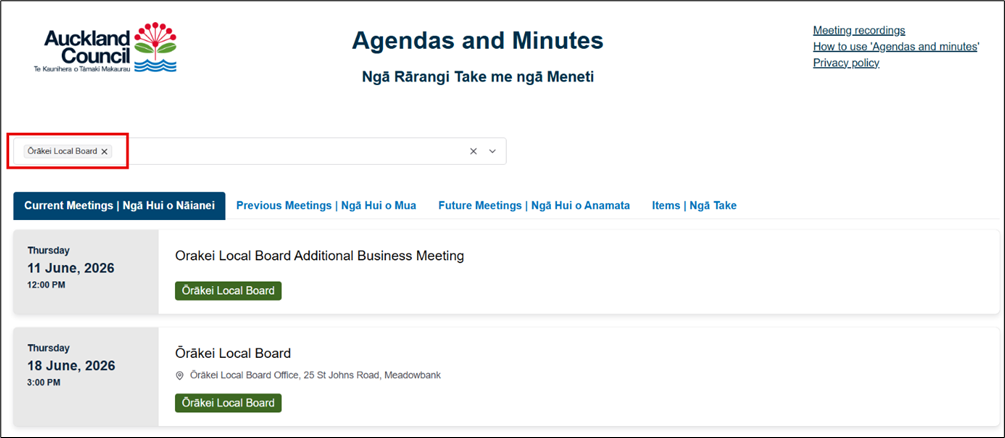
3. You can select more than one type of meeting. To clear the search, select the ‘x’ button on the right hand side of the meeting search field.

How to access the agenda for a meeting or workshop
1. Select the meeting or workshop you are interested in. Select the double arrow button to preview the agenda or select the ‘Open’ button to access the meeting documents. If there is no 'Open’ button it means the documents are not yet available.

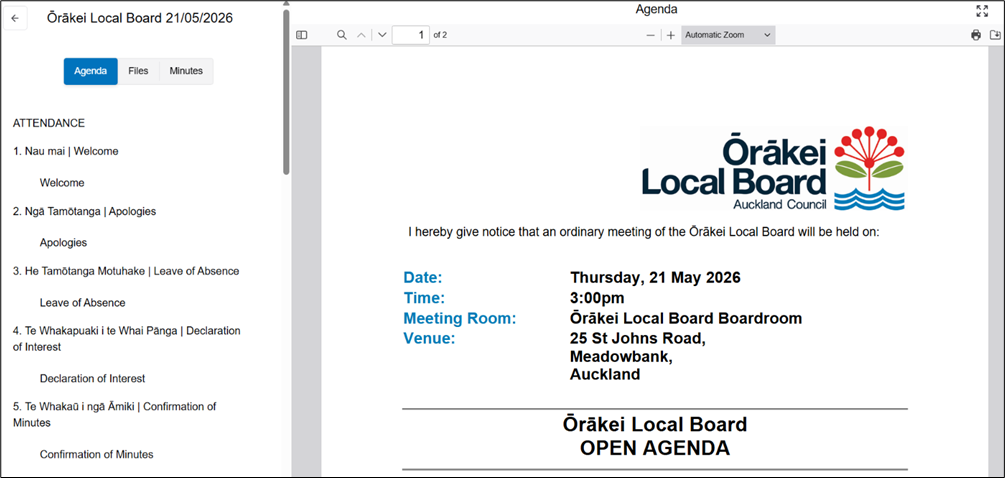
2. Once you select ‘Open,’ it will display the agenda document in the main window and the agenda items in the left pane.
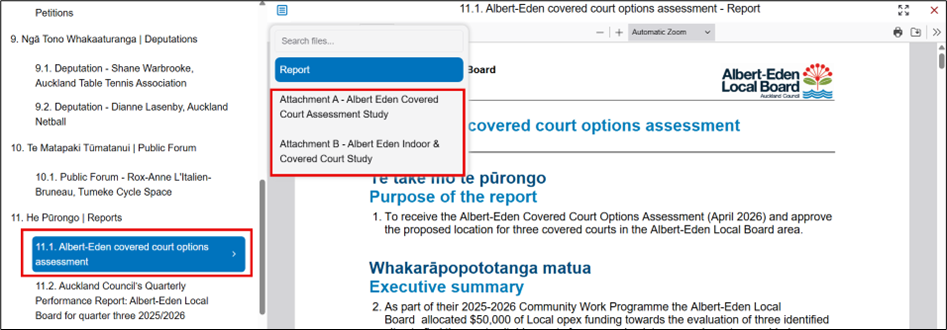
3. Select an agenda item from the lefthand pane and it will display the report content in the window on the right. It will also show all attachments associated with that report. Select the name of the attachment from the drop-down menu to access the content.
How to access files linked to a meeting or workshop
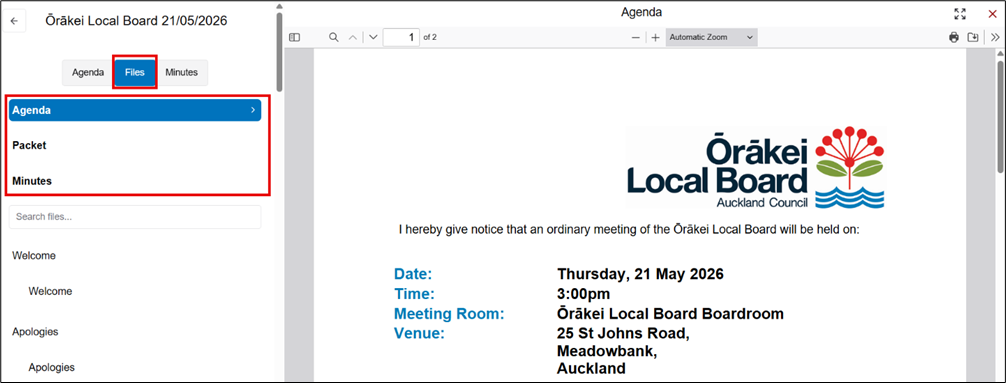
Select the ‘Files’, tab to view all the available file types.
- Agenda: This is a summary of the items that will be discussed in the meeting.
- Packet: This is a single document which includes all meeting and workshop reports. You can download the PDF to your device or computer. You can also print it.
- Minutes: Meeting minutes will be published after a meeting has finished. This will include all the decisions made for each agenda item.
Find a past term document by meeting name
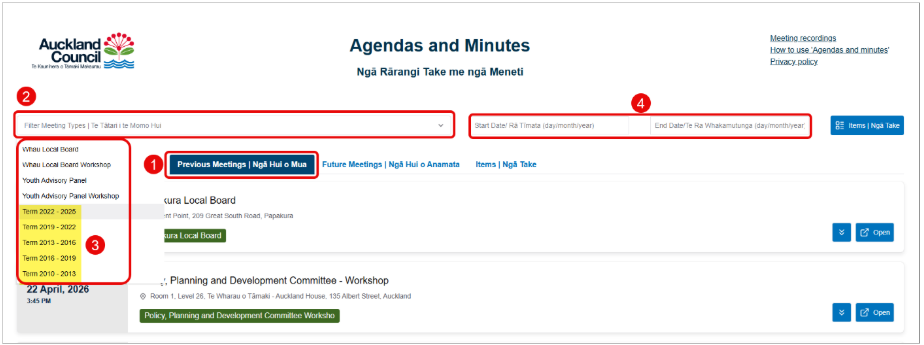
1. Select the 'Previous Meetings' tab.
2. Select the 'Filter Meeting Types' field then scroll to the bottom of the drop-down menu to find the list of previous election terms.
3. Choose the relevant election term.
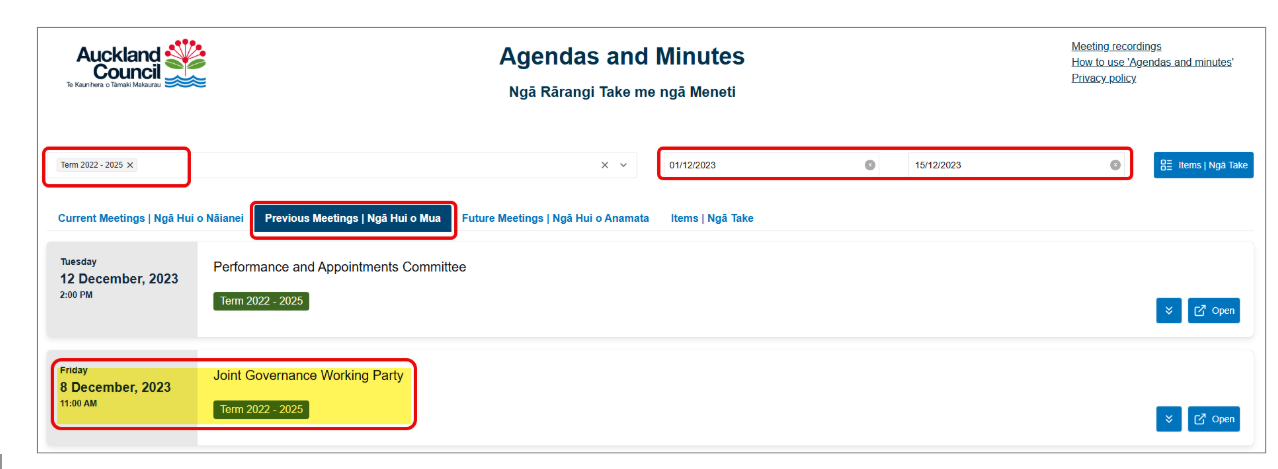
4. Enter the start and end date to narrow your search. The results will automatically update to display documents for the selected date range.
Example – Searching for a Joint Governance Working Party Meeting in 2023
Find a past term document by report name
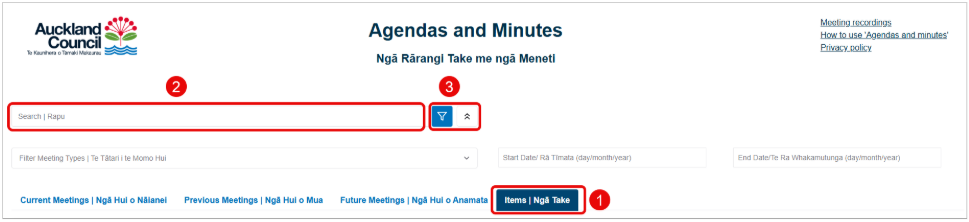
1. Select the 'Items' tab.
2. In the 'Search' field, enter the full or partial name of the report or item you are searching for. The results will automatically update to display related documents.
3. Narrow the search further by selecting a 'Meeting type' from the drop-down list or select the double arrows button to enter a start and end date. The results will automatically update to display documents for the selected date range.
If you cannot find a document
Email the records team at records@aucklandcouncil.govt.nz if you cannot find the document you need.
Past term meeting documents
All the Governing Body, committees, local board, workshops and advisory panels meetings and workshops held from 2010 haves been migrated to the new 'Agendas and minutes' website.
The past Auckland Council terms are:
- Term 2022 – 2025
- Term 2019 – 2022
- Term 2019 – 2016
- Term 2016 – 2013
- Term 2013 – 2010.
- Budget Committee Workshop
- Budget Committee
- Climate Action Transport Targeted Rate
- Governance and Oversight Group
- Council Controlled Organisation Direction and Oversight Committee
- Council Controlled Organisation Direction and Oversight Committee Workshop
- Devonport-Takapuna Local Board Community Forum
- Emergency Committee
- Governing Body Release of Workshop Material
- Joint Governance Working Party
- Kaipātiki Local Board Community Forum
- Manurewa Local Board Swimming Pool Fencing Exemptions Committee
- National Policy Statement - Freshwater Management Political Working Group
- Open Space, Sport and Recreation Joint Political Working Group
- Parks Committee
- Performance and Appointments Committee
- Policy and Planning Committee
- Policy and Planning Committee Workshop
- Rangihoua Reserve and Onetangi Sports Park Reserve Management Plan Hearing and Approval Committee
- Regional Parks Political Working Group
- Revenue, Expenditure and Value Committee
- Revenue, Expenditure and Value Committee Workshop
- Social Impact Fund Allocation Committee Appointments Committee
- Stadium Venues Political Working Group
- Transport, Resilience and Infrastructure Committee
- Transport, Resilience and Infrastructure Workshop
- Waste Political Advisory Group.
- Auckland City Centre Advisory Board
- Council Controlled Organisation Oversight Committee
- Emergency Committee
- Environment and Climate Change Committee
- Finance and Performance Committee
- Henderson-Massey Local Board Hearings Panel
- Heritage Advisory Panel
- Parks, Arts, Community and Events Committee
- Planning Committee
- Rangihoua and Onetangi Sports Park Reserve Management Plan Development Committee
- Regulatory Committee
- Rodney Local Board Parks and Recreation Committee
- Rodney Local Board Transport, Infrastructure and Environment Committee
- Strategic Procurement Committee
- Te Oro Committee of the Maungakiekie-Tamaki Local Board
- Upper Harbour Local Board Community Forum
- Waiheke Transport Forum
- Weed Management Political Advisory Group.
- Appointments, Performance Review and Value for Money Committee
- Civil Defence and Emergency Management Group Committee
- Community Development and Safety Committee
- Environment and Community Committee
- Rangihoua and Onetangi Sports Park Reserve Management Plan Development Committee.
- Albert-Eden Local Board Grants Committee
- Albert-Eden Local Board Swimming Pool Fencing Exemptions Committee
- Arts, Culture and Events Committee
- Auckland Development Committee
- Auckland Plan Committee
- Auckland Future Vision Committee
- Budget Committee
- Central Facility Partnerships Committee
- Central Joint Funding Committee
- Chief Executive Officer Review Committee
- Community Safety Forum
- Council Controlled Organisations Governance and Monitoring Committee
- Devonport-Takapuna Local Board Swimming Pool Committee
- Devonport-Takapuna, Kaipatiki, Upper Harbour and ECB Subdivision Local Board Funding Committee
- Economic Development Committee
- Economic Forum
- Environment and Sustainability Forum
- Environment, Climate Change and Natural Heritage Committee
- Franklin Local Board Swimming Pool Fencing Exemptions Committee
- Great Barrier Environment Committee
- H&B Facilities and Reserves
- Henderson-Massey Local Board Swimming Pool Fencing Exemptions Committee
- Hibiscus and Bays Facilities and Reserves Committee
- Hibiscus and Bays Local Board Swimming Pool Fencing Exemptions Committee
- Howick Local Board Finance and Performance Committee
- Howick Local Board Swimming Pool Fencing Exemptions Committee
- Infrastructure Committee
- Isthmus Local Board Joint Funding Committee
- Māngere-Otāhuhu Local Board Hearings Committee
- Maungakiekie-Tamaki Local Board Alcohol Ban Hearing Panel
- Maungakiekie-Tamaki Local Board Arts Culture and Recreation Committee
- Maungakiekie-Tamaki Local Board Community Engagement Development Grants and Events Committee
- Maungakiekie-Tamaki Local Board Environment, Economic and Community Development Committee
- Maungakiekie-Tamaki Local Board Hearings Committee
- Maungakiekie-Tamaki Local Board Planning Economic Development and Environment Committee
- Maungakiekie-Tāmaki Local Board Strategy Finance Transport CCOs and Infrastructure Committee
- Maungakiekie-Tamaki Local Board Strategy, Finance, Planning and Transport Committee
- Maungakiekie-Tamaki Local Board Swimming Pool Fencing Exemptions Committee
- Northern Joint Funding Committee
- Onehunga Foreshore Dog Access Panel
- Ōrākei Local Board Alcohol Ban Review Panel
- Ōrākei Local Board Dog Access Review Panel
- Ōrākei Local Board Swimming Pool Fencing Exemptions Committee
- Papakura Local Board Swimming Pool Subcommittee
- Parks, Recreation and Sport Committee
- Planning and Urban Design Forum
- Puketāpapa Local Board Alcohol Ban Review Panel
- Puketāpapa Local Board Dog Access Review Panel
- Puketāpapa Local Board Swimming Pool Fencing Exemptions Committee
- Regional Strategy and Policy Committee
- Regulatory and Bylaws Committee
- Rodney and Hibiscus Coast Subdivision Local Board Funding Sub Committee
- Rodney Local Board Swimming Pool Fencing Exemptions Committee
- Social and Community Development Forum
- Tenders and Procurement Committee
- Unitary Plan Committee
- Waiheke Local Board Swimming Pool Fencing Exemption Committee
- Waitākere Ranges Local Board Swimming Pool Fencing Exemptions Committee
- Waitematā Local Board Finance Committee
- Waitematā Local Board Grants Committee
- Waitematā Local Board Hearings Committee
- Western Joint Funding Committee
- Whau Local Board Events Committee
- Whau Local Board Swimming Pool Fencing Exemptions Committee.
- Accountability and Performance Committee
- Chief Executive Review Subcommittee
- Council Controlled Organisations Strategy Review Subcommittee
- Culture Arts and Events Forum
- Disability Strategic Advisory Group
- Ethnic Peoples Advisory Panel
- Parks, Recreation and Heritage Forum
- Regional Development and Operations Committee
- Regulatory and Bylaws Committee
- Southern Joint Funding Committee
- Strategy and Finance Committee
- Tenders and Procurement Subcommittee
- Transport Committee.