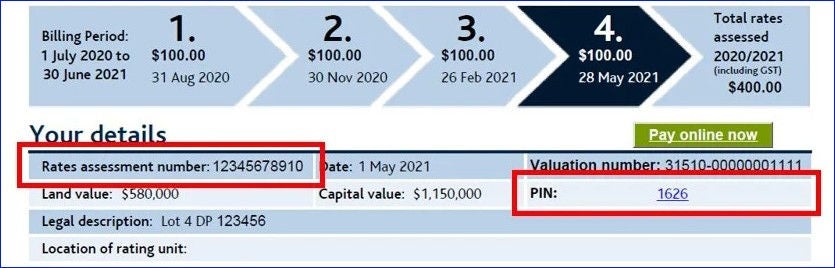
The PIN does not appear on reminder notices or reminder emails, just property rates bills.
You will need your PIN only once to add a property to your myAUCKLAND account.
If you get your property rates bill by email
If you get your rates bill by email, open the PDF attachment and click on the PIN number. If you have a myAUCKLAND account, all your property information will load to it automatically.
If you get your property rates bill by post
If you get your rates bill by post, enter both the PIN and rates assessment number manually. Do this either when you first register for myAUCKLAND or when you have your account open.
Once you have your myAUCKLAND account open:
- Under the 'My property rates' heading, look for the 'Go to my property rates’ button and click it.
- Under the 'My properties' heading, look for the 'Add a property' button and click it.
- The next screen is where you can enter your rates assessment number and PIN.
Privacy of property information
You will be able to access a property's rates information on myAUCKLAND with the PIN, or if the person with the PIN gives you access.
If the property is sold, you will no longer have access to manage the property. However, you will still be able to view all the transactions from the period you owned the property.